> ## Documentation Index
> Fetch the complete documentation index at: https://docs.suprsend.com/llms.txt
> Use this file to discover all available pages before exploring further.
# Preference Evaluation
> Understand how SuprSend evaluates user, tenant, and category preferences at trigger time and at delivery nodes to decide whether to send each notification through a channel.
This guide explains how preferences are evaluated when workflows trigger notifications. For an overview of preferences, see [User Preferences](/docs/user-preferences).
## When are preferences evaluated?
SuprSend evaluates category-level preference opt-outs **at trigger time** — before the workflow run starts. If a user has opted out of the preference category linked to the workflow, the workflow is not executed for that user, avoiding unnecessary workflow runs and saving compute.
**Channel-level preferences** (which specific channels the user has opted into within a category) are still evaluated at each delivery node, since the workflow needs to reach the send step to determine eligible channels.
**Workflows with side effects keep the check at the delivery node.** If a workflow contains a [webhook](/docs/webhook) node (external API call) or a data update node ([update user profile](/docs/update-user-profile), [add/remove user from list](/docs/add-user-to-list), [subscribe/unsubscribe to object](/docs/subscribe-to-object)), the category opt-out check remains at the delivery node instead of the trigger. This ensures that side effects like API calls and data updates still execute even when the user has opted out of receiving notifications.
**Test triggers from the dashboard check preferences at the send node.** When you test a workflow using the **Test** button in the workflow editor on the SuprSend dashboard, the category opt-out check happens at the delivery node instead of the trigger. This lets you run the entire workflow logic end-to-end and verify that every step executes correctly, including preference evaluation at each send node, without the workflow being short-circuited at the trigger.
## How preferences are resolved
If user preferences aren't set, the system picks the default preference setting. Once a user sets a preference for a category, future changes to default preferences do **not** override the user's choice.
If you are triggering notifications for a tenant, [tenant default preferences](/docs/tenant-preference#tenant-admin-setting-defaults-for-their-users) override category-level default preferences.
The order of precedence is always `user > tenant > category default`. However, if you turn off notifications in a category from the [tenant page](https://app.suprsend.com/en/demo/tenants), users will not receive notifications in that category, even if they previously opted in.
User preferences may change over time. When debugging, you can inspect the exact preferences that were active at that moment.
* **Trigger-level opt-out**: If a user was opted out at trigger time, the workflow execution log will show that the workflow was skipped due to category preference opt-out.
* **Delivery-node-level check**: For channel-level preferences or workflows with side effects, you can view the preference evaluation using the step-by-step debugger in [workflow executions](https://app.suprsend.com/en/demo/logs/executions/?last_n_minutes=1440).
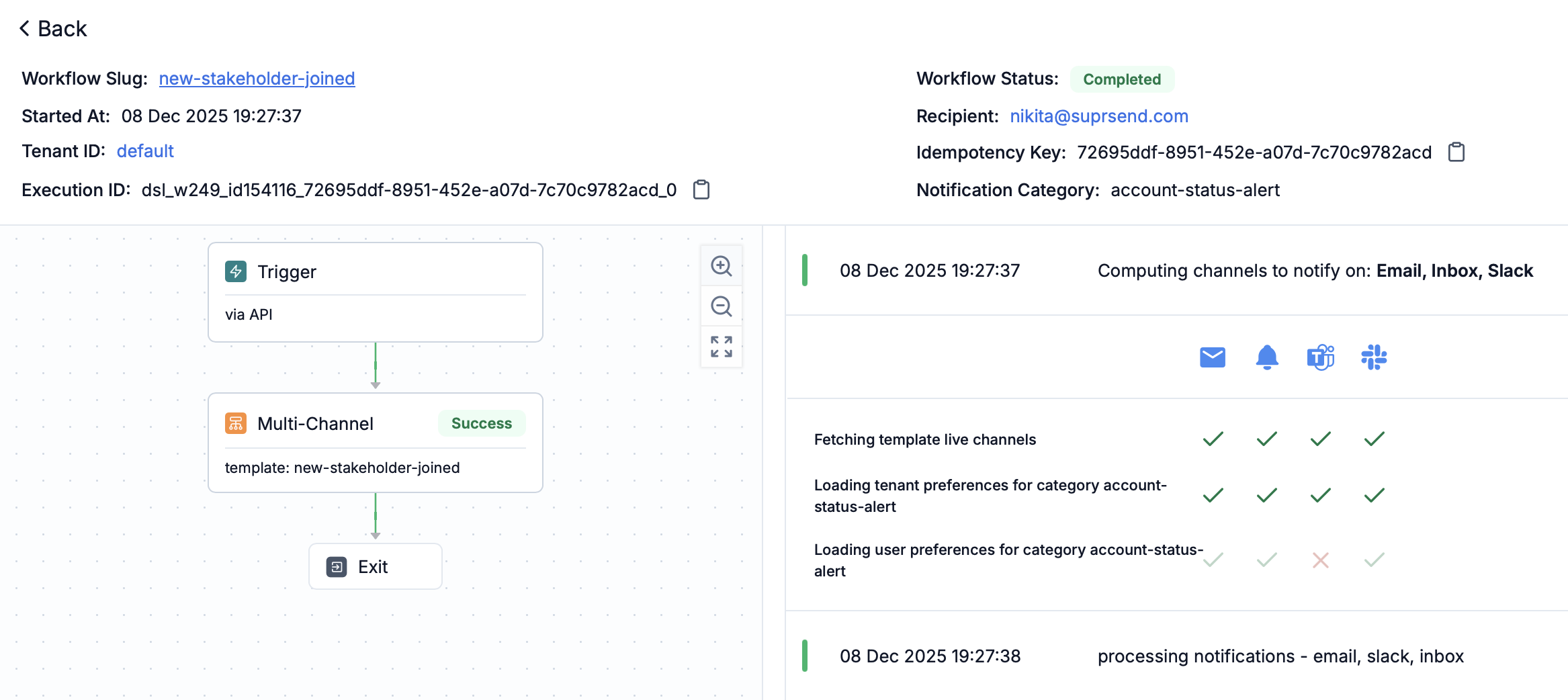 Use the "Preference Evaluation" panel in each workflow step to see what preference blocked or allowed the notification.
You can also track when a user updated their preference by filtering on `Subscriber preference update` in [request logs](https://app.suprsend.com/en/demo/logs/api/?last_n_minutes=1440).
## Preference precedence order
The system evaluates preferences in this order:
1. **User preference** - Individual user's explicit preference setting
2. **Tenant default preference** - Default preference set at tenant level
3. **Category default preference** - Default preference set at the category level
If a user has explicitly set a preference, that takes precedence. If not, the system checks tenant defaults, and finally falls back to category-level defaults.
Channel-level opt-outs (for example, email unsubscribe, SMS STOP, mobile OS push opt-out) override all category and tenant preferences.
## Resolving digest schedule and condition values
When a workflow references a category's [digest schedule](/docs/managing-notification-categories#configuring-digest-schedule) or a [condition property](/docs/managing-notification-categories#configuring-condition-properties), SuprSend resolves the value at trigger time using the **same precedence** as preferences:
1. **User value** — the option or value the recipient selected.
2. **Tenant default** — the tenant-level override, if the user hasn't set one.
3. **Category default** — the default configured on the sub-category.
* **Digest schedule:** a [Digest node](/docs/digest) with schedule type `category_digest_schedule` batches each recipient's notifications on their resolved cadence, in the recipient's timezone. If the category has no digest schedule enabled, the notification is sent immediately without batching.
* **Condition properties:** referenced in [branch conditions](/docs/branch) as `$category.properties.`, the resolved value is used to decide which branch a recipient takes. If a dynamic condition has no value at runtime, it resolves to `null` — handle that case in your branch logic.
Use the "Preference Evaluation" panel in each workflow step to see what preference blocked or allowed the notification.
You can also track when a user updated their preference by filtering on `Subscriber preference update` in [request logs](https://app.suprsend.com/en/demo/logs/api/?last_n_minutes=1440).
## Preference precedence order
The system evaluates preferences in this order:
1. **User preference** - Individual user's explicit preference setting
2. **Tenant default preference** - Default preference set at tenant level
3. **Category default preference** - Default preference set at the category level
If a user has explicitly set a preference, that takes precedence. If not, the system checks tenant defaults, and finally falls back to category-level defaults.
Channel-level opt-outs (for example, email unsubscribe, SMS STOP, mobile OS push opt-out) override all category and tenant preferences.
## Resolving digest schedule and condition values
When a workflow references a category's [digest schedule](/docs/managing-notification-categories#configuring-digest-schedule) or a [condition property](/docs/managing-notification-categories#configuring-condition-properties), SuprSend resolves the value at trigger time using the **same precedence** as preferences:
1. **User value** — the option or value the recipient selected.
2. **Tenant default** — the tenant-level override, if the user hasn't set one.
3. **Category default** — the default configured on the sub-category.
* **Digest schedule:** a [Digest node](/docs/digest) with schedule type `category_digest_schedule` batches each recipient's notifications on their resolved cadence, in the recipient's timezone. If the category has no digest schedule enabled, the notification is sent immediately without batching.
* **Condition properties:** referenced in [branch conditions](/docs/branch) as `$category.properties.`, the resolved value is used to decide which branch a recipient takes. If a dynamic condition has no value at runtime, it resolves to `null` — handle that case in your branch logic.