> ## Documentation Index
> Fetch the complete documentation index at: https://docs.suprsend.com/llms.txt
> Use this file to discover all available pages before exploring further.
# Sub-tenants
> Nest tenants in a parent–child tree. Preferences, templates, vendors, branding, and properties flow from parent to child — set them once at the top and override only where you need to.
**Sub-tenants** let you nest [tenants](/docs/tenants) in a parent–child tree, up to **5 levels deep**. A child automatically inherits its parent's preferences, templates, vendors, branding, and properties — you only override what should differ at that level. Use it when you'd otherwise be copying the same setup across many tenants.
## Usecases it solves
* **Build hierarchical admin preferences.** Take a project management tool with Company → Project → Cycle. An admin turns email off at the Company and no user gets email in any Project or Cycle; turn it back on for one Cycle and only that Cycle sends email.
* **Users can set different preferences along the tenant tree.** A user picks "don't email me" at the Company and it holds for every Project and Cycle; turn email on for one Project and they get email for that Project and its Cycles, still opted out everywhere else.
* **Globally turn off a channel or category for a tenant.** Turn off email at the company level to keep costs down, block SMS at a customer's tenant when their plan doesn't include it, or turn off a specific notification category at the project level so it stays off for every tenant below.
* **Inherit templates, vendors, and branding — override where you need to.** A white-label agency can let each client brand have its own vendors (Twilio, SendGrid, FCM) and templates. A notification SaaS can give each customer a default template that their sites, projects, or downstream customers tweak.
* **Users can have a different profile per tenant.** The same person can be a team member on one Project and the project manager on another, each with the role, channels, and properties that fit that tenant. If sub-tenants represent different apps of the same customer, each app tenant stores that user's push token and channel identity for that app, while their name, email, and other shared properties come from the tenant above.
## Key concepts
| Concept | Meaning |
| ------------------- | -------------------------------------------------------------------------------------------------------------------------------------------------------------------------------------------------------------------------------------------------------------------------------------------------------------------------------------------------------- |
| **Parent** | Each tenant can have a single parent (`parent_id`). A tenant with no parent is a **root**. |
| **Level** | Depth in the tree. Root = level 0. Maximum level = 4 (5 levels total). |
| **Ancestors** | The chain of parent tenants from the root down to a given tenant's immediate parent. Does not include the tenant itself. |
| **Inheritance** | A child uses its parent's value for a setting until it explicitly sets its own. |
| **Live cascade** | Inheritance is resolved at trigger/read time — editing a parent immediately affects descendants that haven't overridden the same value. There is no copy-on-create snapshot. |
| **Locked cascade** | A setting where an ancestor's value is unioned into every descendant and cannot be removed lower down. A descendant's own value adds to the effective set; sending an empty value is accepted but the ancestor's contribution still applies. Used by tenant-level and category-level `blocked_channels`, and category-level `enabled_for_tenant: false`. |
| **Effective value** | The value actually applied at send time after walking the chain. |
| **Shallow merge** | Merging happens one key at a time. Overriding one key never blocks other keys from inheriting. Nested structures are not deep-merged. |
## How it works
Create a sub-tenant by passing `parent_id` in the [tenant upsert API](/reference/create-update-tenants) — the tenant becomes a child of that parent. Skip `parent_id` (or send `null`) to create a root tenant.
```bash cURL theme={"system"}
curl -X POST https://hub.suprsend.com/v1/tenant/eu-sales/ \
-H "Authorization: Bearer __api_key__" \
-H "Content-Type: application/json" \
-d '{
"name": "EU Sales",
"parent_id": "eu"
}'
```
`parent_id` is the only field you send. SuprSend maintains and returns two more fields on every tenant response to describe its place in the tree:
* **`ancestors`** — the chain of parent IDs from the root down to the tenant's immediate parent, root first. Does not include the tenant itself.
* **`level`** — the tenant's position in the tree. `0` = root, `4` = deepest allowed.
### How inheritance resolves
At trigger time, SuprSend walks the ancestor chain to figure out which value applies. Almost everything resolves bottom up — the closest tenant to where the notification fired wins. The one exception is channel and category blocks set at the tenant level, which cascade the other way and can't be undone.
 Here's how each field type resolves:
#### Tenant properties
Tenant's custom and reserved properties (`logo`, colors, `preference_page_url`, `social_links`) are shallow merged from parent to child.
* **Inheritance is per key**. Overriding `support_email` on a child still lets `company_name`, `region`, etc. inherit from above.
* `id` and `name` are never inherited; each tenant has its own.
```text theme={"system"}
Company (Level 0):
{
"company_name": "Acme",
"support_email": "help@acme.com"
}
Project (Level 1):
{
"support_email": "web-support@acme.com",
"team": "Web"
}
Effective at Cycle (Level 2):
{
"company_name": "Acme", // inherited from Company
"support_email": "web-support@acme.com", // from Project — overrides one key
"team": "Web" // from Project — adds a new key
}
// Company later updates company_name → "Acme Corp"
// Cycle effective immediately shows "Acme Corp"
// (live cascade — nothing below overrode it)
```
📘 [Create / Update Tenants →](/reference/create-update-tenants) | [Update Tenant Properties →](/reference/update-tenant-properties)
#### Tenant category-level preferences
For each notification category, a tenant can either set default preferences that descendants override key by key, or hard-block the category — or specific channels within it — so no descendant can re-enable them. Update a category via the [Update Tenant Category Preference](/reference/update-tenant-preference-single-category) endpoint:
```bash cURL theme={"system"}
curl -X PATCH https://hub.suprsend.com/v1/tenant/tenant-1/preference/category/promotions/ \
-H "Authorization: Bearer __api_key__" \
-H "Content-Type: application/json" \
-d '{
"preference": "opt_in",
"opt_in_channels": ["email", "androidpush", "iospush"],
"blocked_channels": ["sms"],
"enabled_for_tenant": true,
"visible_to_subscriber": true,
"digest_schedule": {
"options": [
{ "id": "daily-9am", "time": { "default_value": "09:00" } }
]
},
"conditions": [
{ "key": "severity_level", "value": "High" }
]
}'
```
Each key inherits independently — send only the ones you want to change:
| Setting | Inheritance behavior |
| ------------------------------------------------------------------ | ----------------------------------------------------------------------------------------------------------------------------------------------------------------------------------------------------------------------------------- |
| **`preference`** (with `mandatory_channels` and `opt_in_channels`) | The category default (`opt_in`, `opt_out`, or `cant_unsubscribe`). Overriding on a child replaces the whole default preference object for that category. Later changes to the parent's `preference` stop propagating to that child. |
| **`blocked_channels`** (per category) | Locked cascade. A child's effective list is the union of every ancestor's blocked channels plus its own. Descendants can *add* more channels but never *remove* an ancestor's. |
| **`enabled_for_tenant`** | Locked cascade. Once a parent disables a category (`enabled_for_tenant: false`), no descendant can re-enable it. |
| **`visible_to_subscriber`** | Inherits until the child sets its own. Once overridden, later parent changes stop propagating to that child. |
| **`digest_schedule`** | Inherits independently — overriding `preference` doesn't detach it. Keeps inheriting from the closest ancestor that set it until the child sets its own. |
| **`conditions`** | Inherits independently, same rule as `digest_schedule`. |
Here's an example flow
```text theme={"system"}
Category "Marketing" (workspace default):
preference: opt_in, blocked_channels: null
Company (Level 0):
preference: "opt_out"
blocked_channels: ["sms"]
Project (Level 1):
visible_to_subscriber: false
blocked_channels: ["email"]
Effective at Cycle (Level 2):
{
"preference": "opt_out", // inherited from Company (override of workspace default)
"blocked_channels": ["sms","email"], // union: sms from Company + email from Project (locked cascade)
"visible_to_subscriber": false // inherited from Project
}
// Cycle sets blocked_channels = [] → accepted, but effective stays ["sms"] (sms is locked from Company).
// Cycle sets blocked_channels = ["whatsapp"] → accepted; effective becomes ["sms", "whatsapp"] (union with Company).
```
📘 [Update Tenant Category Preference →](/reference/update-tenant-preference-single-category) | [Get Tenant Category Preference →](/reference/get-tenant-preference-single-category) | [Tenant Preferences →](/docs/tenant-preference)
#### Tenant blocked channels
Set `blocked_channels` on the tenant itself (not scoped to any category) to globally turn a channel off for every user of that tenant, across every category — including root categories and ones marked `cant_unsubscribe`. Update it via the same [Create / Update Tenants](/reference/create-update-tenants) endpoint:
```bash cURL theme={"system"}
curl -X POST https://hub.suprsend.com/v1/tenant/tenant-1/ \
-H "Authorization: Bearer __api_key__" \
-H "Content-Type: application/json" \
-d '{
"blocked_channels": ["inbox"]
}'
```
This is a **locked cascade** — a channel blocked at any ancestor stays blocked for every tenant below. Descendants can add more blocks but never remove an ancestor's.
```text theme={"system"}
Company (Level 0):
blocked_channels: ["sms"]
Project (Level 1):
blocked_channels: ["inbox"]
Effective at Cycle (Level 2):
blocked_channels: ["sms", "inbox"] // union of Company + Project
// Cycle sets blocked_channels = [] → accepted, but effective stays ["sms", "inbox"].
// Cycle sets blocked_channels = ["whatsapp"] → accepted; effective becomes ["sms", "inbox", "whatsapp"].
```
📘 [Create / Update Tenants →](/reference/create-update-tenants)
#### Per-tenant user preference
A user can set their own preferences on any tenant they belong to. Every user preference — category or channel — is always saved against a tenant; there is no workspace-wide user preference. At trigger time, walk up from where the notification fired; the *first* value the user has explicitly set wins. Update via the [Update User Category Preference](/reference/update-user-category-preference) or [Update User Channel Preference](/reference/update-user-channel-preference) endpoint — the `tenant_id` query param scopes each write to a specific tenant and is required:
```bash cURL theme={"system"}
# Category preference (scoped to tenant-1)
curl -X PATCH "https://hub.suprsend.com/v1/user/user-123/preference/category/promotions/?tenant_id=tenant-1" \
-H "Authorization: Bearer __api_key__" \
-H "Content-Type: application/json" \
-d '{
"preference": "opt_in",
"opt_out_channels": ["sms"],
"digest_schedule": {
"id": "daily-9am",
"time": "09:00"
},
"properties": [
{ "key": "severity_level", "value": "High" }
]
}'
# Channel preference (scoped to tenant-1)
curl -X PATCH "https://hub.suprsend.com/v1/user/user-123/preference/channel_preference/?tenant_id=tenant-1" \
-H "Authorization: Bearer __api_key__" \
-H "Content-Type: application/json" \
-d '{
"channel_preferences": [
{ "channel": "email", "is_restricted": true }
]
}'
```
* **User Preference supports 2 granularities** — **category preferences** (opt in/out per notification category, and per channel within a category) and **channel preferences** (restrict or allow a channel across every category the user is subscribed to).
* **Category preferences fall back to the tenant's resolved default** — if the user hasn't set one anywhere in the chain, the tenant's default for that category applies.
* **Channel preferences have no tenant default** — set `is_restricted: true` on a channel to restrict, `false` to allow. If the user has never set it anywhere in the chain, the channel is treated as unrestricted. Mandatory channels on `cant_unsubscribe` categories still fire when restricted.
* **Channel preferences apply as a group** — once a child sets its own `channel_preferences`, it replaces the parent's list entirely; the parent's restrictions on other channels no longer apply at that child.
* **Within a category, each key inherits independently** — changing `preference` doesn't detach `digest_schedule` or condition `properties`; each keeps inheriting from the closest ancestor until the user sets their own.
* **`cant_unsubscribe` at the triggered tenant beats a user's opt-out** — when the tenant's resolved preference for a category is `cant_unsubscribe` at the triggered tenant, the notification still sends on that tenant's effective `mandatory_channels` even if the user opted out anywhere in the ancestor chain. Only the triggered tenant's mandatory channels apply — ancestors' mandatory channel lists don't stack.
Here's an example flow:
```text theme={"system"}
Setup — Category "Marketing":
Tenant defaults:
Company: opt_out
Project: cant_unsubscribe, mandatory_channels: ["email"]
Alice's category preferences:
Company: opt_out // "don't send Marketing to me from Company"
Alice's channel preferences:
Company: [{ slack: is_restricted }]
Project: [{ email: is_restricted }]
Trigger at Cycle (under Project) for Alice:
Category resolves to cant_unsubscribe, mandatory: ["email"] // Project's default wins at Cycle
Channel preferences resolve [{ email: is_restricted }] // Project's list wins; Company's slack is NOT merged in
→ Notification sends on email // mandatory channel at triggered tenant beats
// Alice's opt-out AND her email restriction
Trigger at Cycle under a different Project (which inherits Company's opt_out):
Category resolves to opt_out // no override in that branch → Company default
→ Notification does NOT send // walk-up finds Alice's opt_out at Company; no mandatory override
```
📘 [Update User Category Preference →](/reference/update-user-category-preference) | [Update User Channel Preference →](/reference/update-user-channel-preference) | [Get User Full Preference →](/reference/get-user-full-preference) | [User Preferences →](/docs/user-preferences)
#### Tenant vendors
For each channel (email, SMS, push, WhatsApp, …), the closest tenant in the chain that configured a vendor wins. Vendors cascade through the full tenant tree today.
* **Per channel, per vendor** — overriding the SMS vendor on a child still lets it inherit the parent's email vendor.
* **Default tenant vendor as final fallback** — if no tenant in the chain configures a vendor for a channel, the default tenant vendor for that channel applies.
The resolved vendor for a tenant + channel is cached for up to **5 minutes**. Adding a new vendor or re-parenting a tenant mid-flight won't interrupt notifications already in progress — the new vendor picks up on the next resolution after the cache expires.
📘 [Tenant Vendors →](/docs/tenant-vendor)
#### Tenant templates *(coming soon)*
For a workflow triggered at any tenant, SuprSend will walk the ancestor chain and pick the closest tenant that has a matching template variant — the same rule as vendors.
* **Per channel** — a child that overrides only the email template keeps inheriting the parent's SMS template.
* **Default tenant fallback** — if no tenant in the chain has a variant for a channel, the default tenant's template applies.
* **Locale fallback within each tenant** — at every tenant along the chain, SuprSend will try the recipient's locale from most specific to least specific (e.g. `es-MX` → `es` → template default like `en`) before moving to the next tenant.
* **Tenant proximity beats locale specificity** — a closer tenant's `en` variant wins over a farther tenant's exact-locale variant. The selector picks the closest tenant that has *any* matching variant for the channel, then applies locale fallback within it.
Today, a workflow triggered at any tenant uses that tenant's template variant if one exists on that exact tenant; otherwise it falls back to the **default tenant's** variant. It does not yet walk the ancestor chain.
📘 [Template Variants →](/docs/template-variants) | [Tenant Templates →](/docs/tenant-templates)
#### Per-tenant user profile *(coming soon)*
A user's effective profile at trigger time will be their global profile merged with each subscribed tenant's per-tenant profile, layered from root down. The lowest tenant in the chain wins on shared fields. Users won't need a subscription at every level — skipped levels contribute nothing.
Today, a user's effective profile at trigger time is their global profile merged with the per-tenant profile at the **triggered tenant only** — profiles on ancestor tenants do not layer in.
📘 [User-Tenant Mapping →](/docs/user-tenant-mapping) | [Upsert User Tenant Profile →](/reference/upsert-user-tenant-profile)
```mermaid theme={"system"}
%%{init: {'theme':'base','themeVariables':{'fontSize':'14px','fontFamily':'ui-sans-serif, system-ui, sans-serif','lineColor':'#9a9a9a'},'flowchart':{'padding':14,'nodeSpacing':40,'rankSpacing':40}}}%%
flowchart TD
R["acme (Root, L0)
Here's how each field type resolves:
#### Tenant properties
Tenant's custom and reserved properties (`logo`, colors, `preference_page_url`, `social_links`) are shallow merged from parent to child.
* **Inheritance is per key**. Overriding `support_email` on a child still lets `company_name`, `region`, etc. inherit from above.
* `id` and `name` are never inherited; each tenant has its own.
```text theme={"system"}
Company (Level 0):
{
"company_name": "Acme",
"support_email": "help@acme.com"
}
Project (Level 1):
{
"support_email": "web-support@acme.com",
"team": "Web"
}
Effective at Cycle (Level 2):
{
"company_name": "Acme", // inherited from Company
"support_email": "web-support@acme.com", // from Project — overrides one key
"team": "Web" // from Project — adds a new key
}
// Company later updates company_name → "Acme Corp"
// Cycle effective immediately shows "Acme Corp"
// (live cascade — nothing below overrode it)
```
📘 [Create / Update Tenants →](/reference/create-update-tenants) | [Update Tenant Properties →](/reference/update-tenant-properties)
#### Tenant category-level preferences
For each notification category, a tenant can either set default preferences that descendants override key by key, or hard-block the category — or specific channels within it — so no descendant can re-enable them. Update a category via the [Update Tenant Category Preference](/reference/update-tenant-preference-single-category) endpoint:
```bash cURL theme={"system"}
curl -X PATCH https://hub.suprsend.com/v1/tenant/tenant-1/preference/category/promotions/ \
-H "Authorization: Bearer __api_key__" \
-H "Content-Type: application/json" \
-d '{
"preference": "opt_in",
"opt_in_channels": ["email", "androidpush", "iospush"],
"blocked_channels": ["sms"],
"enabled_for_tenant": true,
"visible_to_subscriber": true,
"digest_schedule": {
"options": [
{ "id": "daily-9am", "time": { "default_value": "09:00" } }
]
},
"conditions": [
{ "key": "severity_level", "value": "High" }
]
}'
```
Each key inherits independently — send only the ones you want to change:
| Setting | Inheritance behavior |
| ------------------------------------------------------------------ | ----------------------------------------------------------------------------------------------------------------------------------------------------------------------------------------------------------------------------------- |
| **`preference`** (with `mandatory_channels` and `opt_in_channels`) | The category default (`opt_in`, `opt_out`, or `cant_unsubscribe`). Overriding on a child replaces the whole default preference object for that category. Later changes to the parent's `preference` stop propagating to that child. |
| **`blocked_channels`** (per category) | Locked cascade. A child's effective list is the union of every ancestor's blocked channels plus its own. Descendants can *add* more channels but never *remove* an ancestor's. |
| **`enabled_for_tenant`** | Locked cascade. Once a parent disables a category (`enabled_for_tenant: false`), no descendant can re-enable it. |
| **`visible_to_subscriber`** | Inherits until the child sets its own. Once overridden, later parent changes stop propagating to that child. |
| **`digest_schedule`** | Inherits independently — overriding `preference` doesn't detach it. Keeps inheriting from the closest ancestor that set it until the child sets its own. |
| **`conditions`** | Inherits independently, same rule as `digest_schedule`. |
Here's an example flow
```text theme={"system"}
Category "Marketing" (workspace default):
preference: opt_in, blocked_channels: null
Company (Level 0):
preference: "opt_out"
blocked_channels: ["sms"]
Project (Level 1):
visible_to_subscriber: false
blocked_channels: ["email"]
Effective at Cycle (Level 2):
{
"preference": "opt_out", // inherited from Company (override of workspace default)
"blocked_channels": ["sms","email"], // union: sms from Company + email from Project (locked cascade)
"visible_to_subscriber": false // inherited from Project
}
// Cycle sets blocked_channels = [] → accepted, but effective stays ["sms"] (sms is locked from Company).
// Cycle sets blocked_channels = ["whatsapp"] → accepted; effective becomes ["sms", "whatsapp"] (union with Company).
```
📘 [Update Tenant Category Preference →](/reference/update-tenant-preference-single-category) | [Get Tenant Category Preference →](/reference/get-tenant-preference-single-category) | [Tenant Preferences →](/docs/tenant-preference)
#### Tenant blocked channels
Set `blocked_channels` on the tenant itself (not scoped to any category) to globally turn a channel off for every user of that tenant, across every category — including root categories and ones marked `cant_unsubscribe`. Update it via the same [Create / Update Tenants](/reference/create-update-tenants) endpoint:
```bash cURL theme={"system"}
curl -X POST https://hub.suprsend.com/v1/tenant/tenant-1/ \
-H "Authorization: Bearer __api_key__" \
-H "Content-Type: application/json" \
-d '{
"blocked_channels": ["inbox"]
}'
```
This is a **locked cascade** — a channel blocked at any ancestor stays blocked for every tenant below. Descendants can add more blocks but never remove an ancestor's.
```text theme={"system"}
Company (Level 0):
blocked_channels: ["sms"]
Project (Level 1):
blocked_channels: ["inbox"]
Effective at Cycle (Level 2):
blocked_channels: ["sms", "inbox"] // union of Company + Project
// Cycle sets blocked_channels = [] → accepted, but effective stays ["sms", "inbox"].
// Cycle sets blocked_channels = ["whatsapp"] → accepted; effective becomes ["sms", "inbox", "whatsapp"].
```
📘 [Create / Update Tenants →](/reference/create-update-tenants)
#### Per-tenant user preference
A user can set their own preferences on any tenant they belong to. Every user preference — category or channel — is always saved against a tenant; there is no workspace-wide user preference. At trigger time, walk up from where the notification fired; the *first* value the user has explicitly set wins. Update via the [Update User Category Preference](/reference/update-user-category-preference) or [Update User Channel Preference](/reference/update-user-channel-preference) endpoint — the `tenant_id` query param scopes each write to a specific tenant and is required:
```bash cURL theme={"system"}
# Category preference (scoped to tenant-1)
curl -X PATCH "https://hub.suprsend.com/v1/user/user-123/preference/category/promotions/?tenant_id=tenant-1" \
-H "Authorization: Bearer __api_key__" \
-H "Content-Type: application/json" \
-d '{
"preference": "opt_in",
"opt_out_channels": ["sms"],
"digest_schedule": {
"id": "daily-9am",
"time": "09:00"
},
"properties": [
{ "key": "severity_level", "value": "High" }
]
}'
# Channel preference (scoped to tenant-1)
curl -X PATCH "https://hub.suprsend.com/v1/user/user-123/preference/channel_preference/?tenant_id=tenant-1" \
-H "Authorization: Bearer __api_key__" \
-H "Content-Type: application/json" \
-d '{
"channel_preferences": [
{ "channel": "email", "is_restricted": true }
]
}'
```
* **User Preference supports 2 granularities** — **category preferences** (opt in/out per notification category, and per channel within a category) and **channel preferences** (restrict or allow a channel across every category the user is subscribed to).
* **Category preferences fall back to the tenant's resolved default** — if the user hasn't set one anywhere in the chain, the tenant's default for that category applies.
* **Channel preferences have no tenant default** — set `is_restricted: true` on a channel to restrict, `false` to allow. If the user has never set it anywhere in the chain, the channel is treated as unrestricted. Mandatory channels on `cant_unsubscribe` categories still fire when restricted.
* **Channel preferences apply as a group** — once a child sets its own `channel_preferences`, it replaces the parent's list entirely; the parent's restrictions on other channels no longer apply at that child.
* **Within a category, each key inherits independently** — changing `preference` doesn't detach `digest_schedule` or condition `properties`; each keeps inheriting from the closest ancestor until the user sets their own.
* **`cant_unsubscribe` at the triggered tenant beats a user's opt-out** — when the tenant's resolved preference for a category is `cant_unsubscribe` at the triggered tenant, the notification still sends on that tenant's effective `mandatory_channels` even if the user opted out anywhere in the ancestor chain. Only the triggered tenant's mandatory channels apply — ancestors' mandatory channel lists don't stack.
Here's an example flow:
```text theme={"system"}
Setup — Category "Marketing":
Tenant defaults:
Company: opt_out
Project: cant_unsubscribe, mandatory_channels: ["email"]
Alice's category preferences:
Company: opt_out // "don't send Marketing to me from Company"
Alice's channel preferences:
Company: [{ slack: is_restricted }]
Project: [{ email: is_restricted }]
Trigger at Cycle (under Project) for Alice:
Category resolves to cant_unsubscribe, mandatory: ["email"] // Project's default wins at Cycle
Channel preferences resolve [{ email: is_restricted }] // Project's list wins; Company's slack is NOT merged in
→ Notification sends on email // mandatory channel at triggered tenant beats
// Alice's opt-out AND her email restriction
Trigger at Cycle under a different Project (which inherits Company's opt_out):
Category resolves to opt_out // no override in that branch → Company default
→ Notification does NOT send // walk-up finds Alice's opt_out at Company; no mandatory override
```
📘 [Update User Category Preference →](/reference/update-user-category-preference) | [Update User Channel Preference →](/reference/update-user-channel-preference) | [Get User Full Preference →](/reference/get-user-full-preference) | [User Preferences →](/docs/user-preferences)
#### Tenant vendors
For each channel (email, SMS, push, WhatsApp, …), the closest tenant in the chain that configured a vendor wins. Vendors cascade through the full tenant tree today.
* **Per channel, per vendor** — overriding the SMS vendor on a child still lets it inherit the parent's email vendor.
* **Default tenant vendor as final fallback** — if no tenant in the chain configures a vendor for a channel, the default tenant vendor for that channel applies.
The resolved vendor for a tenant + channel is cached for up to **5 minutes**. Adding a new vendor or re-parenting a tenant mid-flight won't interrupt notifications already in progress — the new vendor picks up on the next resolution after the cache expires.
📘 [Tenant Vendors →](/docs/tenant-vendor)
#### Tenant templates *(coming soon)*
For a workflow triggered at any tenant, SuprSend will walk the ancestor chain and pick the closest tenant that has a matching template variant — the same rule as vendors.
* **Per channel** — a child that overrides only the email template keeps inheriting the parent's SMS template.
* **Default tenant fallback** — if no tenant in the chain has a variant for a channel, the default tenant's template applies.
* **Locale fallback within each tenant** — at every tenant along the chain, SuprSend will try the recipient's locale from most specific to least specific (e.g. `es-MX` → `es` → template default like `en`) before moving to the next tenant.
* **Tenant proximity beats locale specificity** — a closer tenant's `en` variant wins over a farther tenant's exact-locale variant. The selector picks the closest tenant that has *any* matching variant for the channel, then applies locale fallback within it.
Today, a workflow triggered at any tenant uses that tenant's template variant if one exists on that exact tenant; otherwise it falls back to the **default tenant's** variant. It does not yet walk the ancestor chain.
📘 [Template Variants →](/docs/template-variants) | [Tenant Templates →](/docs/tenant-templates)
#### Per-tenant user profile *(coming soon)*
A user's effective profile at trigger time will be their global profile merged with each subscribed tenant's per-tenant profile, layered from root down. The lowest tenant in the chain wins on shared fields. Users won't need a subscription at every level — skipped levels contribute nothing.
Today, a user's effective profile at trigger time is their global profile merged with the per-tenant profile at the **triggered tenant only** — profiles on ancestor tenants do not layer in.
📘 [User-Tenant Mapping →](/docs/user-tenant-mapping) | [Upsert User Tenant Profile →](/reference/upsert-user-tenant-profile)
```mermaid theme={"system"}
%%{init: {'theme':'base','themeVariables':{'fontSize':'14px','fontFamily':'ui-sans-serif, system-ui, sans-serif','lineColor':'#9a9a9a'},'flowchart':{'padding':14,'nodeSpacing':40,'rankSpacing':40}}}%%
flowchart TD
R["acme (Root, L0)
logo, primary_color, support_email
blocked_channels: [sms]"]
R --> P1["project-1 (Project, L1)
support_email overridden"]
R --> P2["mobile-app (Project, L1)"]
P1 --> C1["sprint-42 (Cycle, L2)
milestone property added"]
P1 --> C2["sprint-43 (Cycle, L2)"]
classDef s1 fill:transparent,stroke:#d9d9d9,stroke-width:1.4px;
classDef s2 fill:transparent,stroke:#b0b0b0,stroke-width:1.4px;
classDef s3 fill:transparent,stroke:#8a8a8a,stroke-width:1.4px;
class R s1;
class P1,P2 s2;
class C1,C2 s3;
```
Trigger a workflow at `sprint-42` and SuprSend takes `logo` and `primary_color` from `acme`, `support_email` from `project-1`, and the `milestone` property from `sprint-42` itself. SMS stays blocked on every send because `acme` locks it at the root — no descendant can turn it back on.
## Adding a sub-tenant
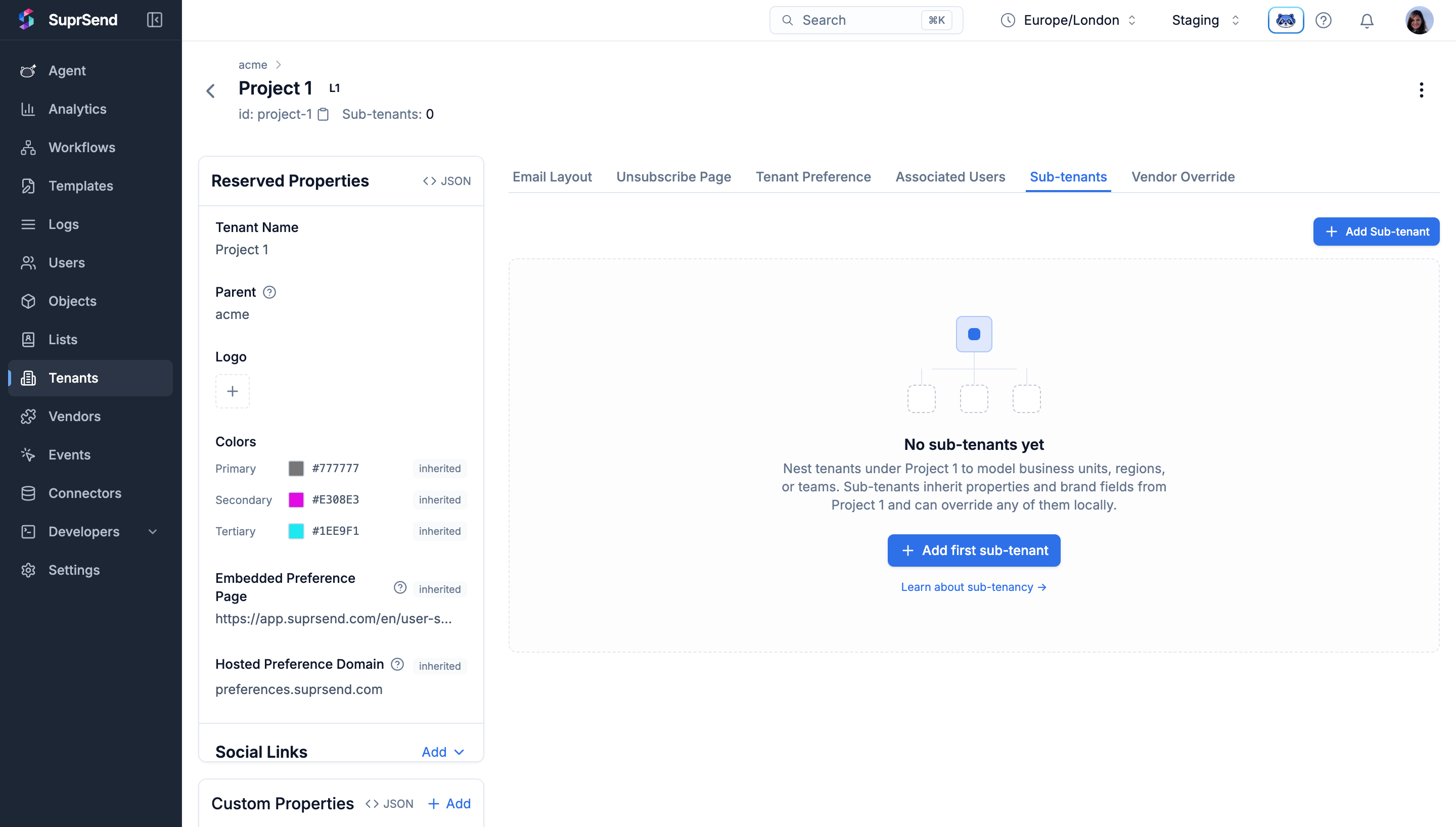
1. Go to **Tenants** in the side nav and open the tenant you want to add a sub-tenant under.
2. Switch to the **Sub-tenants** tab and click **Add Sub-tenant**.
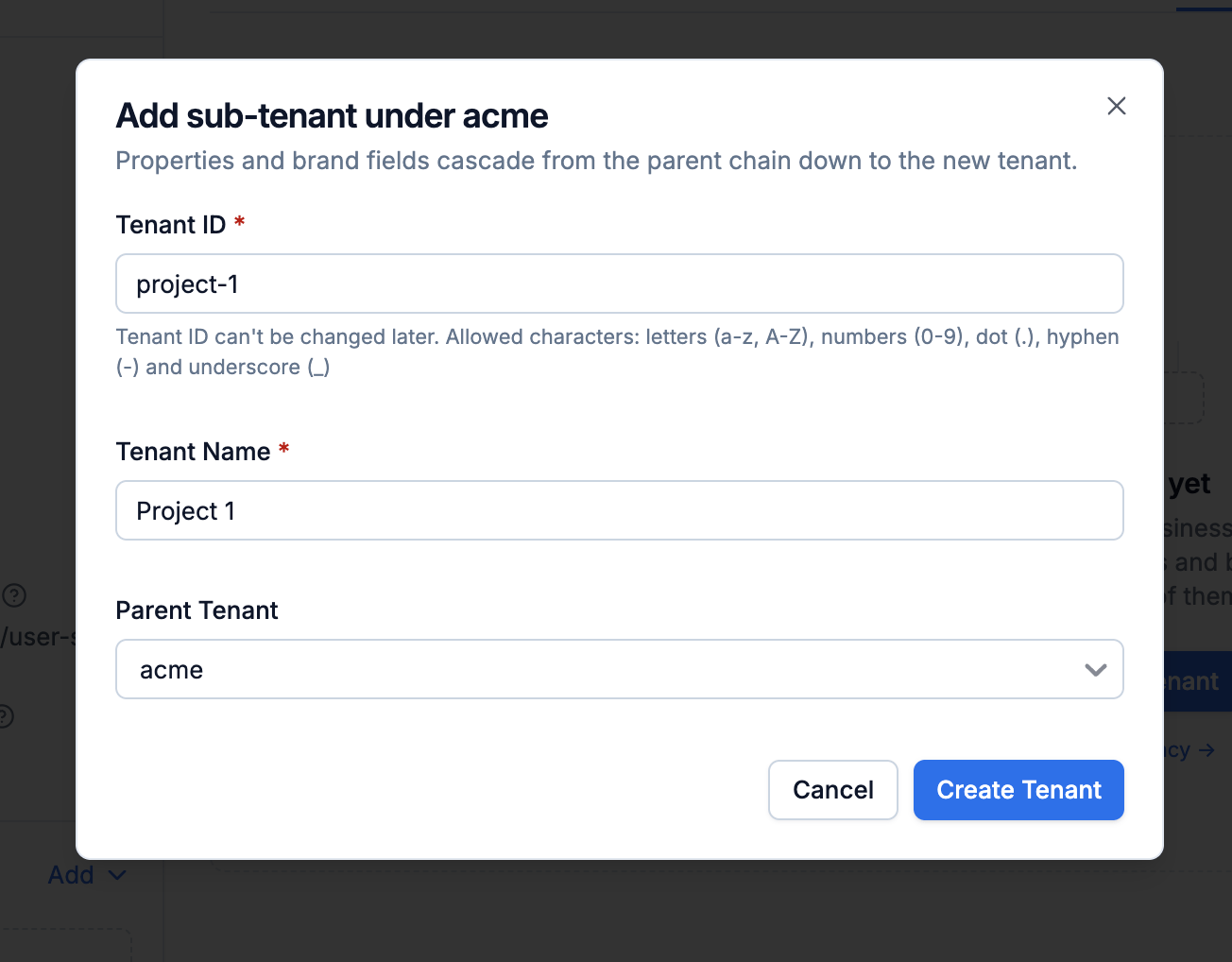
 3. In the modal, enter a **Tenant ID** (unique across the workspace, ≤ 64 chars, characters `[a-z0-9_.-]`) and a **Name**. The parent is prefilled from the tenant you opened; if that tenant already has sub-tenants of its own, you can pick any tenant in its subtree as the parent instead. Click on Create Tenant.
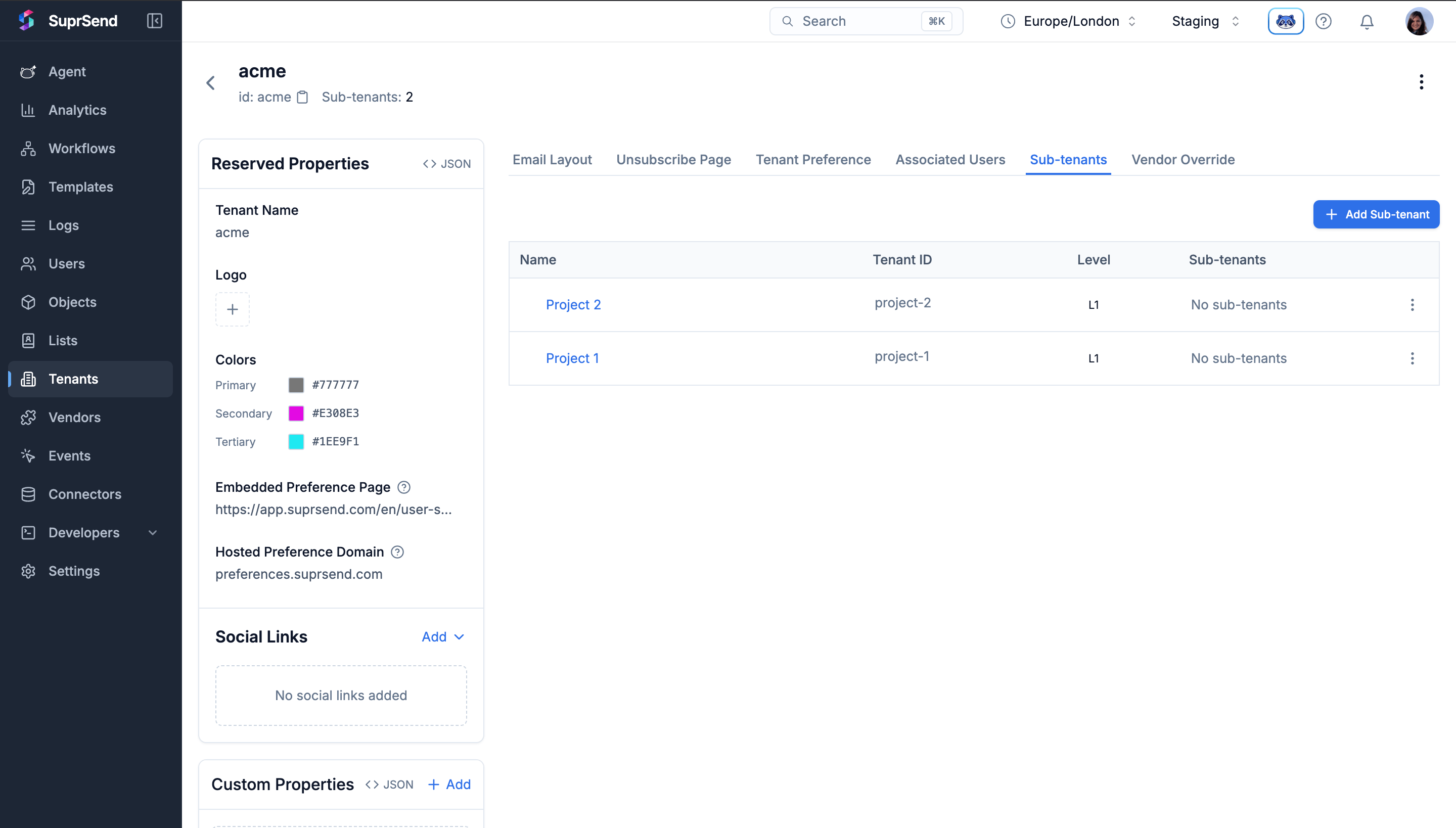
 The new sub-tenant starts inheriting branding, properties, vendors, and preferences from the parent immediately; Click on it to override the properties or preference for this sub-tenant.
 Once at least one sub-tenant exists in your workspace, the **Add Tenant** action on the Tenants listing page also exposes a **Parent tenant** picker — so you can create a new tenant anywhere in the hierarchy without opening its parent first.
Create a sub-tenant by passing `parent_id` in the [tenant upsert API](/reference/create-update-tenants).
```bash Request theme={"system"}
curl -X POST https://hub.suprsend.com/v1/tenant/project-1/ \
-H "Authorization: Bearer __api_key__" \
-H "Content-Type: application/json" \
-d '{
"name": "Project 1",
"parent_id": "acme",
"properties": { "support_email": "web-support@acme.com", "team": "Web" },
"social_links": { "website": "https://acme.com/web" }
}'
```
```json Response theme={"system"}
{
"id": "project-1",
"name": "Project 1",
"parent_id": "acme",
"ancestors": ["acme"],
"level": 1,
"logo": null,
"primary_color": null,
"social_links": { "website": "https://acme.com/web" },
"properties": { "support_email": "web-support@acme.com", "team": "Web" },
"children_count": 0
}
```
Fields you don't send stay `null` on the child and resolve from the ancestor chain at send time. Skip `parent_id` (or send `null`) to create a root tenant.
## Re-parent or delink a tenant
Change the `parent_id` on an existing tenant to move it (and its entire subtree) somewhere else in the tree, or delink it from its parent so it becomes a root again. On the API it's a single field — set `parent_id` to a new tenant to re-parent, or send `null` (or an empty string) to delink. On the dashboard the two flows are surfaced as separate actions.
On the **Sub-tenants** tab, click the three-dot menu next to a sub-tenant. You'll see the options to **Change Parent** or **Delink Parent**.
Once at least one sub-tenant exists in your workspace, the **Add Tenant** action on the Tenants listing page also exposes a **Parent tenant** picker — so you can create a new tenant anywhere in the hierarchy without opening its parent first.
Create a sub-tenant by passing `parent_id` in the [tenant upsert API](/reference/create-update-tenants).
```bash Request theme={"system"}
curl -X POST https://hub.suprsend.com/v1/tenant/project-1/ \
-H "Authorization: Bearer __api_key__" \
-H "Content-Type: application/json" \
-d '{
"name": "Project 1",
"parent_id": "acme",
"properties": { "support_email": "web-support@acme.com", "team": "Web" },
"social_links": { "website": "https://acme.com/web" }
}'
```
```json Response theme={"system"}
{
"id": "project-1",
"name": "Project 1",
"parent_id": "acme",
"ancestors": ["acme"],
"level": 1,
"logo": null,
"primary_color": null,
"social_links": { "website": "https://acme.com/web" },
"properties": { "support_email": "web-support@acme.com", "team": "Web" },
"children_count": 0
}
```
Fields you don't send stay `null` on the child and resolve from the ancestor chain at send time. Skip `parent_id` (or send `null`) to create a root tenant.
## Re-parent or delink a tenant
Change the `parent_id` on an existing tenant to move it (and its entire subtree) somewhere else in the tree, or delink it from its parent so it becomes a root again. On the API it's a single field — set `parent_id` to a new tenant to re-parent, or send `null` (or an empty string) to delink. On the dashboard the two flows are surfaced as separate actions.
On the **Sub-tenants** tab, click the three-dot menu next to a sub-tenant. You'll see the options to **Change Parent** or **Delink Parent**.
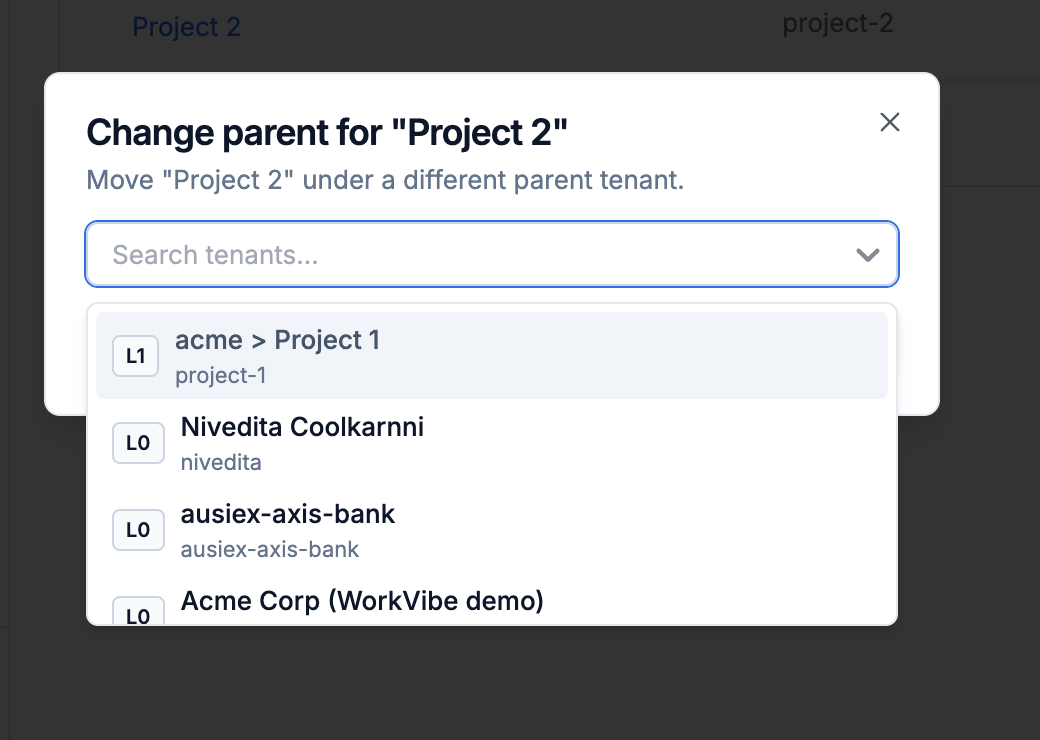
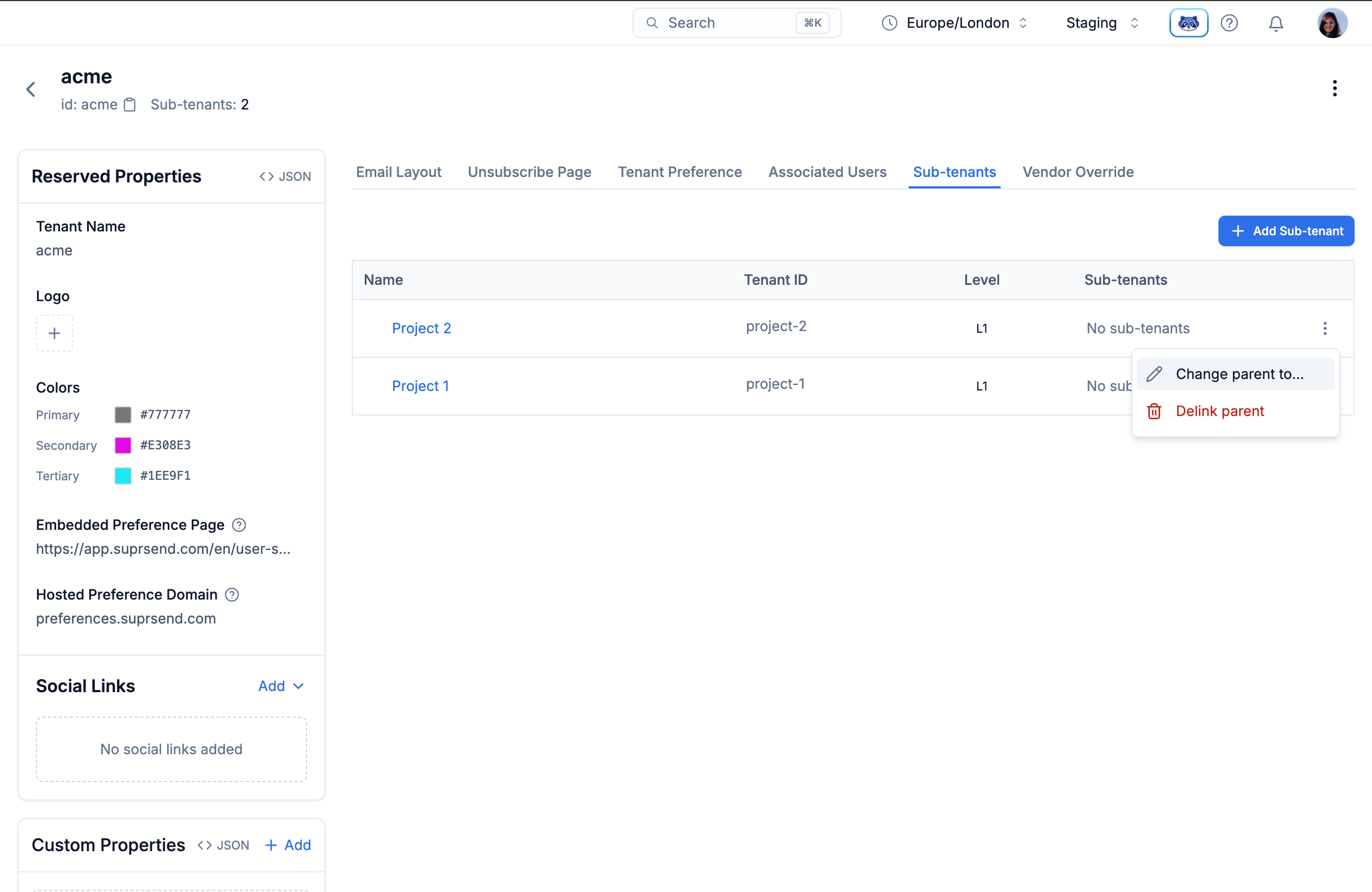 **Change Parent** — pick a new parent from the selector. Any parent that would push the moved subtree past level 4 is disabled. Confirm to move the tenant (and every tenant below it) under the new parent. Inherited values are recomputed against the new chain.
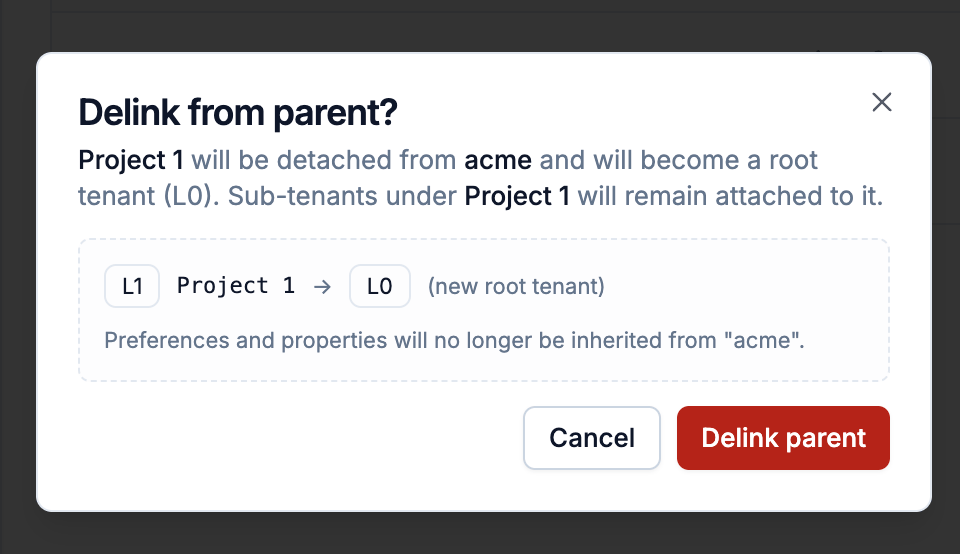
 **Delink Parent** — detaches the tenant from its current parent and promotes it to a root. Its subtree comes along; local values stay as they are; values and preferences that were being inherited from the parent chain stop applying.
 Send `parent_id` on the tenant upsert endpoint — a tenant ID to re-parent, or `null` (or an empty string) to delink and promote to a root:
```bash cURL theme={"system"}
curl -X POST https://hub.suprsend.com/v1/tenant/project-1/ \
-H "Authorization: Bearer __api_key__" \
-H "Content-Type: application/json" \
-d '{ "parent_id": "acme" }' # or: "parent_id": null to delink
```
Local values on the moved tenant (and every tenant below it) stay as they are. Inherited values are resolved from the new chain at the next send.
A re-parent that would push any tenant in the moved subtree past level 4 is rejected with a 400. So is any move that would create a loop (moving a tenant under one of its own descendants).
## Delete a tenant
Deleting a tenant is permanent — its settings, preferences, and per-tenant profiles are gone, and creating a new tenant with the same ID doesn't restore any previous settings. Notifications already in flight are not affected — they finish with the settings that were in effect when they were triggered. When the tenant has children, you decide what happens to them with `children_action`.
| `children_action` | What happens to the children |
| ----------------------------------------------- | ------------------------------------------------------------------------------------------------------------------------------------------------------------------------------------------- |
| `"orphan"` (default, also applied when omitted) | Children become **root tenants**. Their data stays; the deleted parent is dropped from their ancestor chain. |
| `"reassign"` | Children move under the tenant given in `reassign_to`. SuprSend checks the new subtree still fits within 5 levels. `reassign_to` is required — if omitted or `null`, the API returns `400`. |
| `"delete"` | Every child (and their children, all the way down) is deleted too. |
Open the tenant's detail page and click the three-dot menu at the top-right corner, then choose **Delete**.
Send `parent_id` on the tenant upsert endpoint — a tenant ID to re-parent, or `null` (or an empty string) to delink and promote to a root:
```bash cURL theme={"system"}
curl -X POST https://hub.suprsend.com/v1/tenant/project-1/ \
-H "Authorization: Bearer __api_key__" \
-H "Content-Type: application/json" \
-d '{ "parent_id": "acme" }' # or: "parent_id": null to delink
```
Local values on the moved tenant (and every tenant below it) stay as they are. Inherited values are resolved from the new chain at the next send.
A re-parent that would push any tenant in the moved subtree past level 4 is rejected with a 400. So is any move that would create a loop (moving a tenant under one of its own descendants).
## Delete a tenant
Deleting a tenant is permanent — its settings, preferences, and per-tenant profiles are gone, and creating a new tenant with the same ID doesn't restore any previous settings. Notifications already in flight are not affected — they finish with the settings that were in effect when they were triggered. When the tenant has children, you decide what happens to them with `children_action`.
| `children_action` | What happens to the children |
| ----------------------------------------------- | ------------------------------------------------------------------------------------------------------------------------------------------------------------------------------------------- |
| `"orphan"` (default, also applied when omitted) | Children become **root tenants**. Their data stays; the deleted parent is dropped from their ancestor chain. |
| `"reassign"` | Children move under the tenant given in `reassign_to`. SuprSend checks the new subtree still fits within 5 levels. `reassign_to` is required — if omitted or `null`, the API returns `400`. |
| `"delete"` | Every child (and their children, all the way down) is deleted too. |
Open the tenant's detail page and click the three-dot menu at the top-right corner, then choose **Delete**.
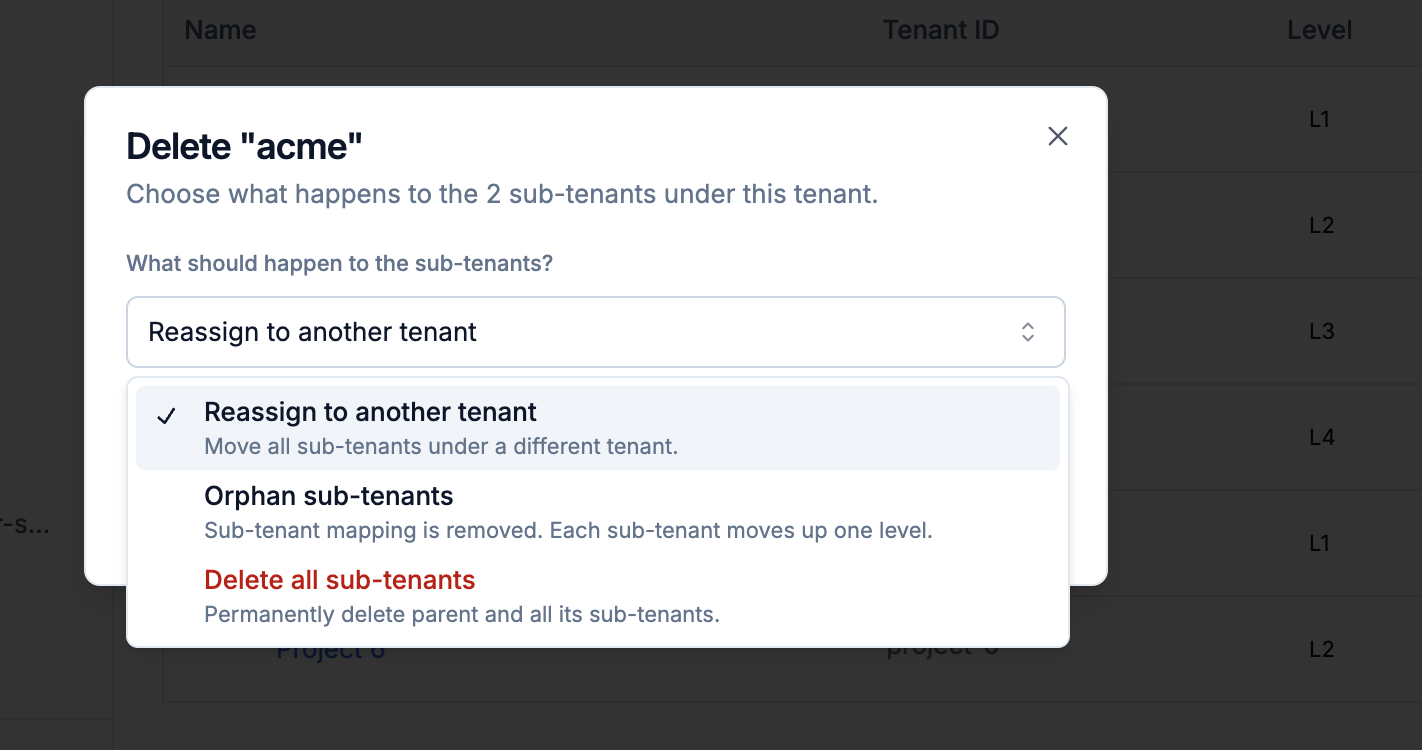
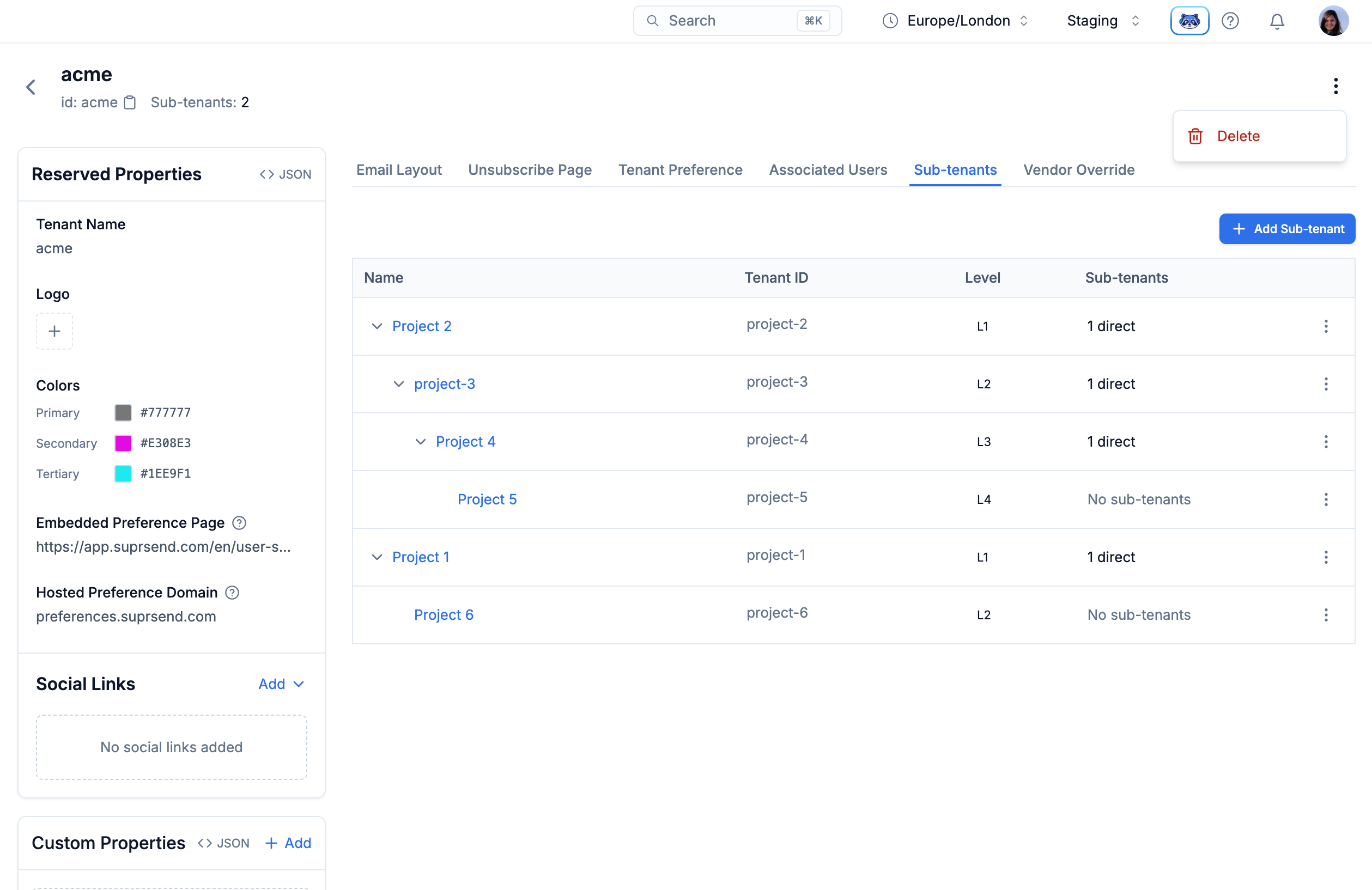 If the tenant has children, the confirmation modal gives you three options — reassign to a specific tenant, leave children as roots, or delete them all. If reassign is selected, you can choose the new parent from the dropdown.
 ```bash cURL theme={"system"}
# Move children under a new parent
curl -X DELETE https://hub.suprsend.com/v1/tenant/project-1/ \
-H "Authorization: Bearer __api_key__" \
-H "Content-Type: application/json" \
-d '{
"children_action": "reassign",
"reassign_to": "project-2"
}'
# Delete every tenant below too
curl -X DELETE https://hub.suprsend.com/v1/tenant/project-1/ \
-H "Authorization: Bearer __api_key__" \
-H "Content-Type: application/json" \
-d '{ "children_action": "delete" }'
# Leave children as root tenants (default)
curl -X DELETE https://hub.suprsend.com/v1/tenant/project-1/ \
-H "Authorization: Bearer __api_key__" \
-H "Content-Type: application/json" \
-d '{ "children_action": "orphan" }'
```
All three return `204 No Content` on success.
## Navigate the tenant listing
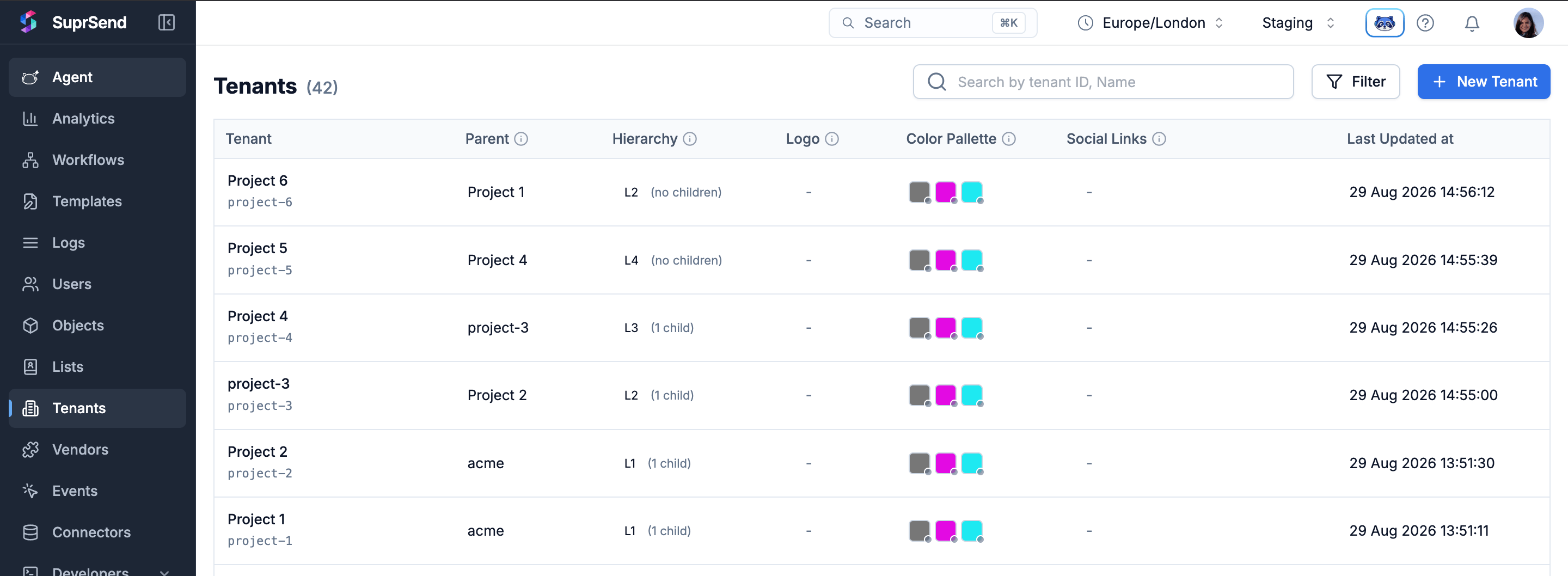
Once sub-tenants exist, the **Tenants** listing adds two columns to every row — **Parent** and **Level** — so you can see each tenant's place in the tree at a glance. On each row, a small dot next to `logo`, brand colors, or `social_links` means that value is **inherited** from an ancestor; no dot means it's set locally on this tenant.
```bash cURL theme={"system"}
# Move children under a new parent
curl -X DELETE https://hub.suprsend.com/v1/tenant/project-1/ \
-H "Authorization: Bearer __api_key__" \
-H "Content-Type: application/json" \
-d '{
"children_action": "reassign",
"reassign_to": "project-2"
}'
# Delete every tenant below too
curl -X DELETE https://hub.suprsend.com/v1/tenant/project-1/ \
-H "Authorization: Bearer __api_key__" \
-H "Content-Type: application/json" \
-d '{ "children_action": "delete" }'
# Leave children as root tenants (default)
curl -X DELETE https://hub.suprsend.com/v1/tenant/project-1/ \
-H "Authorization: Bearer __api_key__" \
-H "Content-Type: application/json" \
-d '{ "children_action": "orphan" }'
```
All three return `204 No Content` on success.
## Navigate the tenant listing
Once sub-tenants exist, the **Tenants** listing adds two columns to every row — **Parent** and **Level** — so you can see each tenant's place in the tree at a glance. On each row, a small dot next to `logo`, brand colors, or `social_links` means that value is **inherited** from an ancestor; no dot means it's set locally on this tenant.
 Use the **filter** icon at the top of the listing to narrow the view:
* **Ancestor** — pick a tenant and the listing shows every tenant in its subtree, at any depth.
* **Level** — restrict to specific depths (`0` = roots, `4` = deepest).
Combine them to narrow further — e.g. ancestor `acme` + level `1` returns every project directly under `acme`.
## Key behaviors and constraints
* **5 levels max.** Root = level 0, deepest allowed = level 4. Every create and re-parent is checked — moves that would go past the limit are rejected with a 400.
* **One parent per tenant.** Every non-root tenant has exactly one `parent_id`. There's no multi-parent or DAG model.
* **`id` is unique across the workspace.** A tenant can't share its `id` with its parent, sibling, or any other tenant. IDs are ≤ 64 chars and accept letters, digits, `.`, `_`, and `-`.
* **Live inheritance.** Editing an ancestor's field takes effect right away for every tenant below that hasn't overridden it. There's no snapshot at create time.
* **Properties are merged per inner key.** Override `social_links.website` on a child and other inner keys (`twitter`, `linkedin`, …) keep inheriting from the parent.
* **Category preferences merge per setting.** Within a category, `preference`, `digest_schedule`, and `conditions` each inherit independently — overriding one doesn't mean that other settings will also stop inheriting.
* **Tenant Preference — blocked channels and categories.** Tenant `blocked_channels`, per-category `blocked_channels`, and category `enabled_for_tenant: false` cascade to every descendant and can't be reversed.
* **Re-parenting is safe.** Local values on the moved tenant stay put; inherited values resolve from the new chain at the next send. Notifications in flight finish with the settings that were in effect at trigger time.
* **The `default` tenant is unchanged.** Every workspace still ships with the `default` tenant. It behaves as a root tenant with no children until you give it any.
## FAQ
5 levels total. Root is level 0; the deepest allowed level is 4. Creates and re-parents that would go past this are rejected with a 400 that names the tenant and level that busted the limit.
Every tenant below it that hasn't overridden `primary_color` picks up the new value right away — the next workflow triggered at any of those tenants uses the new value. Tenants that set their own `primary_color` aren't affected.
Yes. A tenant with `parent_id: null` is a root and behaves exactly like flat tenants do today. You can use sub-tenants for one part of your customer base and leave the rest flat.
Not in this phase. Only `properties`, brand fields, tenant-level `blocked_channels`, and the category-level block settings (`enabled_for_tenant`, `visible_to_subscriber`, per-category `blocked_channels`) cascade. Everything else applies to the triggered tenant only. Hierarchy support for the rest ships in a later phase — reach out to [support@suprsend.com](mailto:support@suprsend.com) if you have a use case that needs it sooner.
Yes. The whole subtree moves with it. SuprSend checks that the moved subtree still fits within the 5-level limit under the new parent, and rejects the move with a 400 if it doesn't. Local values on every tenant in the subtree stay as they are; inherited values resolve from the new chain at the next send.
Yes. Deletes are soft — the old record is marked deleted and no longer reachable by `id`. Creating a new tenant with the same `id` starts a brand-new record; it does **not** bring back the deleted tenant's users, subscriptions, or history.
No. Send-time resolution is optimized and doesn't add measurable latency, even at the maximum depth of 5 levels.
Inheritance is resolved live at send time, so a workflow triggered after the parent update should already reflect the new value. If it doesn't, check that (a) the write on the parent actually returned 200, (b) you're triggering at the right child (`parent_id` and `ancestors` match what you expect), and (c) the field isn't overridden on the child — a local value always wins over an inherited one.
A `blocked_channels` block at any level flows down and can't be undone. The descendant's effective list at send time is the **union** across the chain — every ancestor's blocks plus its own. If you were trying to *unblock* a channel by removing it from a child's `blocked_channels`, that isn't possible — an ancestor's block always wins. Remove it at the level where it was originally set.
No. Every user preference — category or channel — is always saved against a tenant. Preference writes require a `tenant_id` query param; without one, the API rejects the request. If your workspace uses just the built-in `default` tenant, all writes land there and behave workspace-wide in practice, but there is no global-across-all-tenants preference on a user.
If you need a **workspace-wide default preference** that individual tenants can then override per user, model your tenants as **sub-tenants of the `default` tenant**. For example, keep the Company at `default`, nest Projects under it, and nest Cycles under each Project. The user's preference at `default` acts as the global default; a preference set on a Project (or a Cycle) wins for triggers scoped to that subtree.
Re-parent each customer tenant so it becomes a **child of the `default` tenant**. `default` then acts as the global layer, and each customer stays its own tenant where users can override.
1. Re-parent every customer tenant to `default` (or create new ones with `parent_id: "default"`). Existing users, subscriptions, and history stay intact.
2. Save the user's global preference by writing to `tenant_id=default`.
3. Save a customer-specific override by writing to `tenant_id=`.
4. At trigger time, pass the customer's `tenant_id`. SuprSend walks up the chain — the customer's preference wins if the user set one there; otherwise the `default` preference applies; if neither is set, the customer tenant's own default preference for the category applies.
Sub-tenants are available on the Enterprise plan and as an add-on for the Business plan, matching how multi-tenancy is available today.
## Next steps
Set admin defaults and lock down channels or categories for an entire subtree.
Use inherited brand values and custom properties in your template content with `$tenant.*` variables.
Pass the leaf tenant's `id` at trigger time and let SuprSend resolve the merged profile.
Full request/response schemas for every tenant endpoint, including the new hierarchy fields.
Use the **filter** icon at the top of the listing to narrow the view:
* **Ancestor** — pick a tenant and the listing shows every tenant in its subtree, at any depth.
* **Level** — restrict to specific depths (`0` = roots, `4` = deepest).
Combine them to narrow further — e.g. ancestor `acme` + level `1` returns every project directly under `acme`.
## Key behaviors and constraints
* **5 levels max.** Root = level 0, deepest allowed = level 4. Every create and re-parent is checked — moves that would go past the limit are rejected with a 400.
* **One parent per tenant.** Every non-root tenant has exactly one `parent_id`. There's no multi-parent or DAG model.
* **`id` is unique across the workspace.** A tenant can't share its `id` with its parent, sibling, or any other tenant. IDs are ≤ 64 chars and accept letters, digits, `.`, `_`, and `-`.
* **Live inheritance.** Editing an ancestor's field takes effect right away for every tenant below that hasn't overridden it. There's no snapshot at create time.
* **Properties are merged per inner key.** Override `social_links.website` on a child and other inner keys (`twitter`, `linkedin`, …) keep inheriting from the parent.
* **Category preferences merge per setting.** Within a category, `preference`, `digest_schedule`, and `conditions` each inherit independently — overriding one doesn't mean that other settings will also stop inheriting.
* **Tenant Preference — blocked channels and categories.** Tenant `blocked_channels`, per-category `blocked_channels`, and category `enabled_for_tenant: false` cascade to every descendant and can't be reversed.
* **Re-parenting is safe.** Local values on the moved tenant stay put; inherited values resolve from the new chain at the next send. Notifications in flight finish with the settings that were in effect at trigger time.
* **The `default` tenant is unchanged.** Every workspace still ships with the `default` tenant. It behaves as a root tenant with no children until you give it any.
## FAQ
5 levels total. Root is level 0; the deepest allowed level is 4. Creates and re-parents that would go past this are rejected with a 400 that names the tenant and level that busted the limit.
Every tenant below it that hasn't overridden `primary_color` picks up the new value right away — the next workflow triggered at any of those tenants uses the new value. Tenants that set their own `primary_color` aren't affected.
Yes. A tenant with `parent_id: null` is a root and behaves exactly like flat tenants do today. You can use sub-tenants for one part of your customer base and leave the rest flat.
Not in this phase. Only `properties`, brand fields, tenant-level `blocked_channels`, and the category-level block settings (`enabled_for_tenant`, `visible_to_subscriber`, per-category `blocked_channels`) cascade. Everything else applies to the triggered tenant only. Hierarchy support for the rest ships in a later phase — reach out to [support@suprsend.com](mailto:support@suprsend.com) if you have a use case that needs it sooner.
Yes. The whole subtree moves with it. SuprSend checks that the moved subtree still fits within the 5-level limit under the new parent, and rejects the move with a 400 if it doesn't. Local values on every tenant in the subtree stay as they are; inherited values resolve from the new chain at the next send.
Yes. Deletes are soft — the old record is marked deleted and no longer reachable by `id`. Creating a new tenant with the same `id` starts a brand-new record; it does **not** bring back the deleted tenant's users, subscriptions, or history.
No. Send-time resolution is optimized and doesn't add measurable latency, even at the maximum depth of 5 levels.
Inheritance is resolved live at send time, so a workflow triggered after the parent update should already reflect the new value. If it doesn't, check that (a) the write on the parent actually returned 200, (b) you're triggering at the right child (`parent_id` and `ancestors` match what you expect), and (c) the field isn't overridden on the child — a local value always wins over an inherited one.
A `blocked_channels` block at any level flows down and can't be undone. The descendant's effective list at send time is the **union** across the chain — every ancestor's blocks plus its own. If you were trying to *unblock* a channel by removing it from a child's `blocked_channels`, that isn't possible — an ancestor's block always wins. Remove it at the level where it was originally set.
No. Every user preference — category or channel — is always saved against a tenant. Preference writes require a `tenant_id` query param; without one, the API rejects the request. If your workspace uses just the built-in `default` tenant, all writes land there and behave workspace-wide in practice, but there is no global-across-all-tenants preference on a user.
If you need a **workspace-wide default preference** that individual tenants can then override per user, model your tenants as **sub-tenants of the `default` tenant**. For example, keep the Company at `default`, nest Projects under it, and nest Cycles under each Project. The user's preference at `default` acts as the global default; a preference set on a Project (or a Cycle) wins for triggers scoped to that subtree.
Re-parent each customer tenant so it becomes a **child of the `default` tenant**. `default` then acts as the global layer, and each customer stays its own tenant where users can override.
1. Re-parent every customer tenant to `default` (or create new ones with `parent_id: "default"`). Existing users, subscriptions, and history stay intact.
2. Save the user's global preference by writing to `tenant_id=default`.
3. Save a customer-specific override by writing to `tenant_id=`.
4. At trigger time, pass the customer's `tenant_id`. SuprSend walks up the chain — the customer's preference wins if the user set one there; otherwise the `default` preference applies; if neither is set, the customer tenant's own default preference for the category applies.
Sub-tenants are available on the Enterprise plan and as an add-on for the Business plan, matching how multi-tenancy is available today.
## Next steps
Set admin defaults and lock down channels or categories for an entire subtree.
Use inherited brand values and custom properties in your template content with `$tenant.*` variables.
Pass the leaf tenant's `id` at trigger time and let SuprSend resolve the merged profile.
Full request/response schemas for every tenant endpoint, including the new hierarchy fields.